Booked by Sales Agents - DejaPayPro
Print
Modified on: Thu, 4 Jun, 2026 at 10:19 AM
- Go to https://calendar.google.com/calendar/u/0/appointments/schedules/AcZssZ0nX-ce9CuSC5ke4LEK9Ys-EpM-_gWPu4cRKBfnZMMwzI75Wj-T24CycsUK5JBkYX4F_GJ7FR49
- Select the date and time.
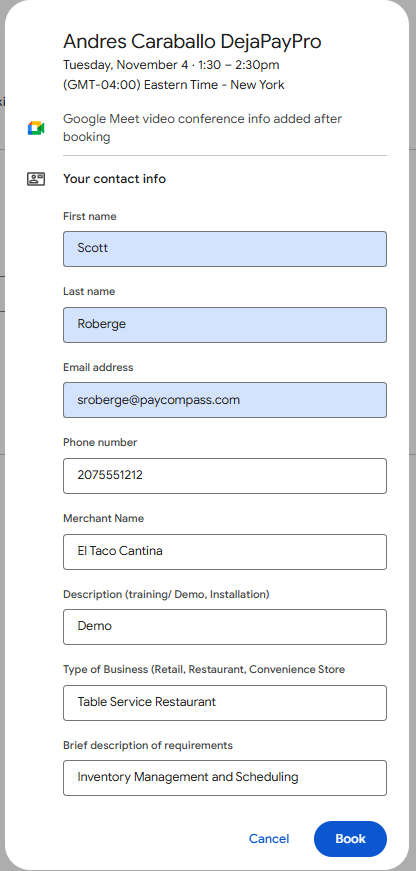
- A pop-up window will appear on the screen. Enter the following information in the pop-up window and click "Book" when completed. (See image below for reference) NOTE: The sales agent will be responsible for forwarding the calendar invite to their merchant.
- Agent's first and last name
- Agent's email address
- Agent's phone number
- Merchant's business name
- In the "Description" field, type "Demo"
- Enter the type of business
- Enter brief description of requirements (Example: Merchant needs inventory management or the ability to schedule employees or needs to consolidate online sales with in-store sales)
Did you find it helpful?
Yes
No
Send feedback Sorry we couldn't be helpful. Help us improve this article with your feedback.
