Step by Step - Navigo Partial Application
Print
Modified on: Fri, 12 Jun, 2026 at 6:29 AM
- Log into Navigo
- Go to the right of the home page > Tap "Start Application" > Click "Partial Application"
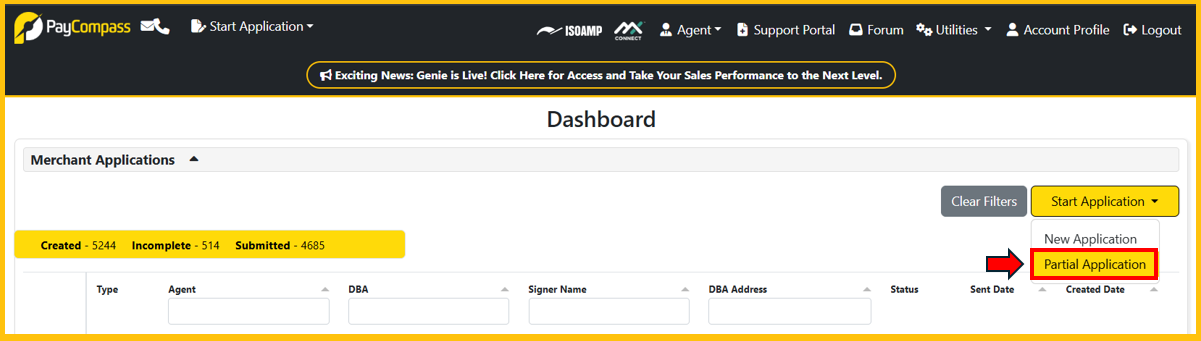
- Upon clicking the "Partial Application" button, a popup window will appear. The popup window will ask which sections will be completed by the Sales Agent. See image below.
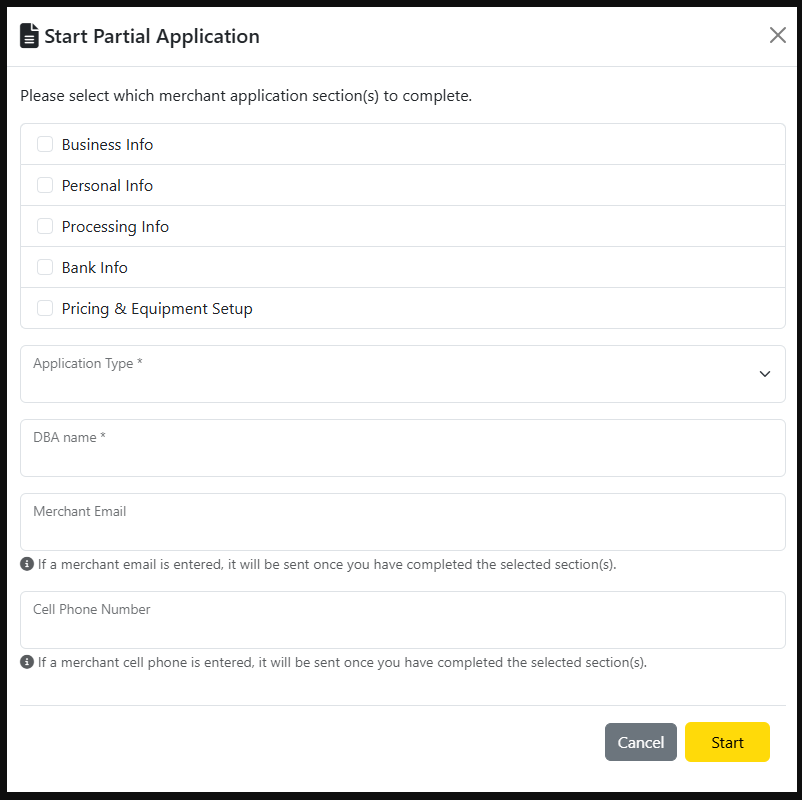
- It's best practice for sales agents to select "Pricing & Equipment Setup" every single time when doing a partial applications. This is required information that the sales agent will need to provide regardless of whether it's partial application or new application. The remaining fields (Business Info, Personal Info, Processing Info, and Bank Info) should be easy for the business owner to complete independently. However, if the sales agent has access to this information, they can select the desired boxes and fill in the information on the business owner's behalf.
- Once the sales agent has selected which sections to complete, they can fill in the required fields.
- Although the "Merchant Email" and "Cell Phone Number" fields are listed as optional, it's best practice to include the information if it's at the sales agent's disposal.
- Once everything has been completed within the popup window, click "Start."
- After clicking "Start" in the popup window, the sales agent will be able to only view and complete the sections that they selected.
- As the sales agent completes each section that they initially selected, they will be prompted to click "Next" at the bottom right of the screen. They will continue with this process until they reach the "Attachments" section. While the "Attachments" section is optional for the sales agent, they can upload attachments that they may have readily available from the merchant. The sales agent will click "Next" once they've either uploaded the attachments OR click "Next" if it will be the merchant's responsibility to upload attachments.
- Clicking "Next" in the previous bullet will send the application directly to the merchant where they will be instructed to complete their sections of the application that were not completed by the sales agent.
- Once the merchant has completed all their assigned sections and has signed the application, the merchant can submit the application where it will be received by the Sales Support team for review prior to them submitting to Underwriting.
Did you find it helpful?
Yes
No
Send feedback Sorry we couldn't be helpful. Help us improve this article with your feedback.
