PART 1: What is Coffee with Closers?
Although Coffee with Closers is primarily geared towards Sales Agents, it also serves an opportunity for all admin/operations/support staff to receive updates as well.
The call is led by PayCompass CEO Justin Volrath. During the first 20 minutes of the call, Justin dedicates time to provide updates with the following:
- Our company and our culture
- Industry updates
- Upcoming events
- Updates with new and current technology and solutions for sales to present to merchants
Once Justin has provided all updates, he opens up the remaining 40 minutes of the call to sales agents.
Given that all CWC calls are never recorded, agents are encouraged to speak freely and share what's on their minds.
Calls have been known to be extremely candid at times whereas some agents use it as an opportunity to share concerns that they feel should be addressed, whether it's our own processes/procedures or whether it's addressing concerns where it appears the competition has more leverage over PayCompass due to their own proprietary solutions in the marketplace.
PART 2: The workflow prior to Coffee with Closers
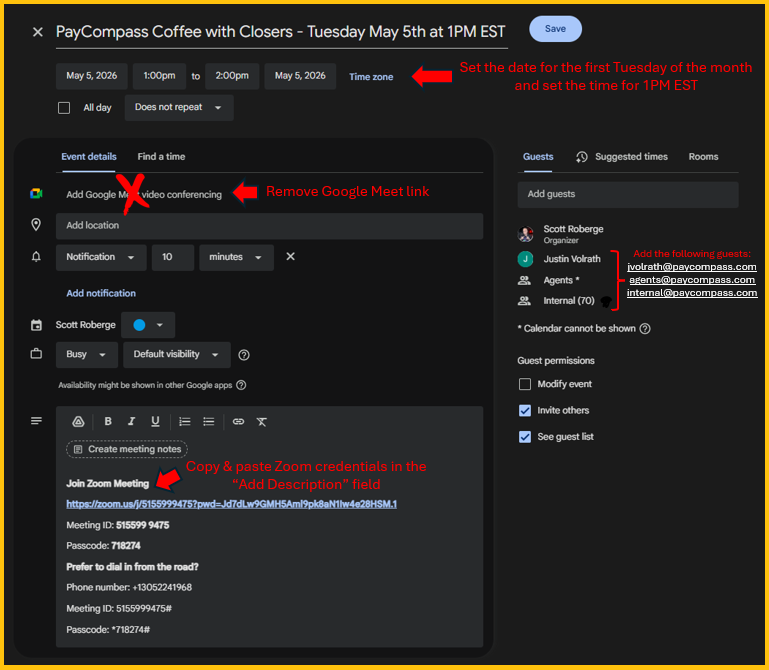
- Once the final Toolbox Tuesday for the month has ended, invites for the following month are sent the next day on Wednesday at Noon EST.
- Invites are created in Google Calendar with the following attendees invited: internal@paycompass.com with the following bcc'd: agents@paycompass.com and jvolrath@paycompass.com
- Invites are always scheduled for the first Tuesday of the upcoming month.
- PayCompass uses the same Zoom credentials for all company calls. The Zoom credentials below should be added to the invites. NOTE: When generating an invite, Google will always add a Google Meet link by default. Be sure to remove the Google Meet link every single time when creating a CWC invite. (See step by step image at the bottom of this card)
Join Zoom Meeting
https://zoom.us/j/5155999475?pwd=Jd7dLw9GMH5Aml9pk8aN1Iw4e28HSM.1
Meeting ID: 515599 9475
Passcode: 718274
Prefer to dial in from the road?
Phone number: +13052241968
Meeting ID: 5155999475#
Passcode: *718274#
PART 3: On the Day of CWC
- On the day of CWC, Marketing will send a reminder email to Justin, sales agents, and internal staff.
- Log into the Zoom call 10 minutes before kickoff.
- Once logged in, your name will appear as "Marketing PayCompass." If you would prefer that your name appear on the screen, click Participants > find "Marketing PayCompass (Host, me)" in the Participants list > hover over the camera icon until three dots appear > click "Rename" > Enter your name and click the blue "Change" button.
- You will appear as the Host until someone from Marketing logs in. Once someone from marketing logs in, they will switch you from Host to Co-Host. They will make Justin a Co-Host as well. NOTE: Marketing will take over as Host whereas they are responsible for ensuring that AI notetakers are disabled and calls are not being recorded.
- If music is going to be played prior to kickoff at 1PM: start the music first > click "Share" at the bottom of the screen > go to the "Advanced" tab in the popup window > click "Computer Audio" > Click "Share" > Rewind your song to the beginning.
PART 4: Step by step image with invites