
Summary:
OrderCounter POS can take on Toast (and WIN) with it's next generation modifiers screen that shows included ingredients as well as options. Indicated ingredients allows staff to know what's included, and tap to remove. Toast requires a separate modifier group that indicates what to leave off (No Onions). Tap an OrderCounter ingredient twice to add a double portion.
OrderCounter vs Toast:
Advantages:
OrderCounter
- Menu built for merchant (Toast asks merchant to built their own with a spreadsheet)
- Hybrid system: SQL Server on location + cloud access and reporting
- No contracts, transparent hardware, SaaS, and fixed processing costs.
- Very reasonable SaaS: Declines as devices are added.
- Handles drive-through's and multi-location (enterprise) reporting / management.
- Cost Advantages: See bottom of this document
Toast
- System includes a managed Cisco router (no server) & extended range install is up to the merchant
- Appears to heavily discount hardware (but makes it up with processing fees)
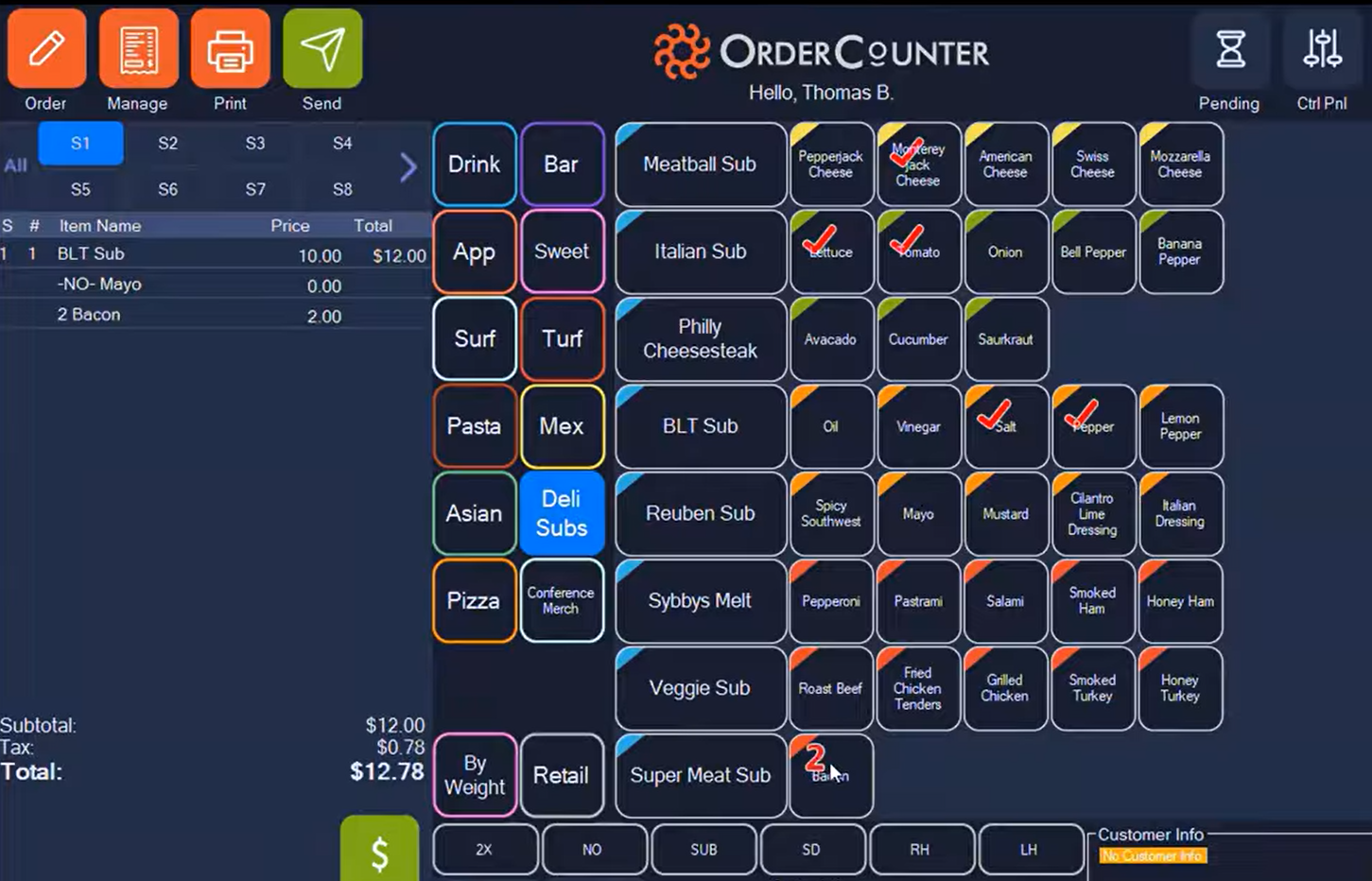
OrderCounter is UNIQUE because of its efficient use of screen real estate -
Notice all the screen content
- Guest Check,
- Categories,
- Items in selected category,
- modifiers (both included and optional). Tap to remove, tap to include!
- Custom (adjusters) for 2x, No, Sub, Right/left half (& can influence prices)
- Custom button size, color, image, placement, font
Neither Clover nor Toast show included ingredients - huge advantage for staff unfamiliar with menu items
Both Clover and Toast require separate modifier groups to show optional ingredients, and unwanted ones.
OC support sub-modifiers (Sandwich, choose soup or salad - choosing salad prompts for dressing choice)
^ ^ ^
Note: OrderCounter also supports dynamic modifiers (noted ^ above) for double (2x)+ingredient, No, Sub, plus Left Hand/Right Hand for pizza. These can also impact the ingredient price.
Neither Clover nor Toast support employee facing images (items and categories)
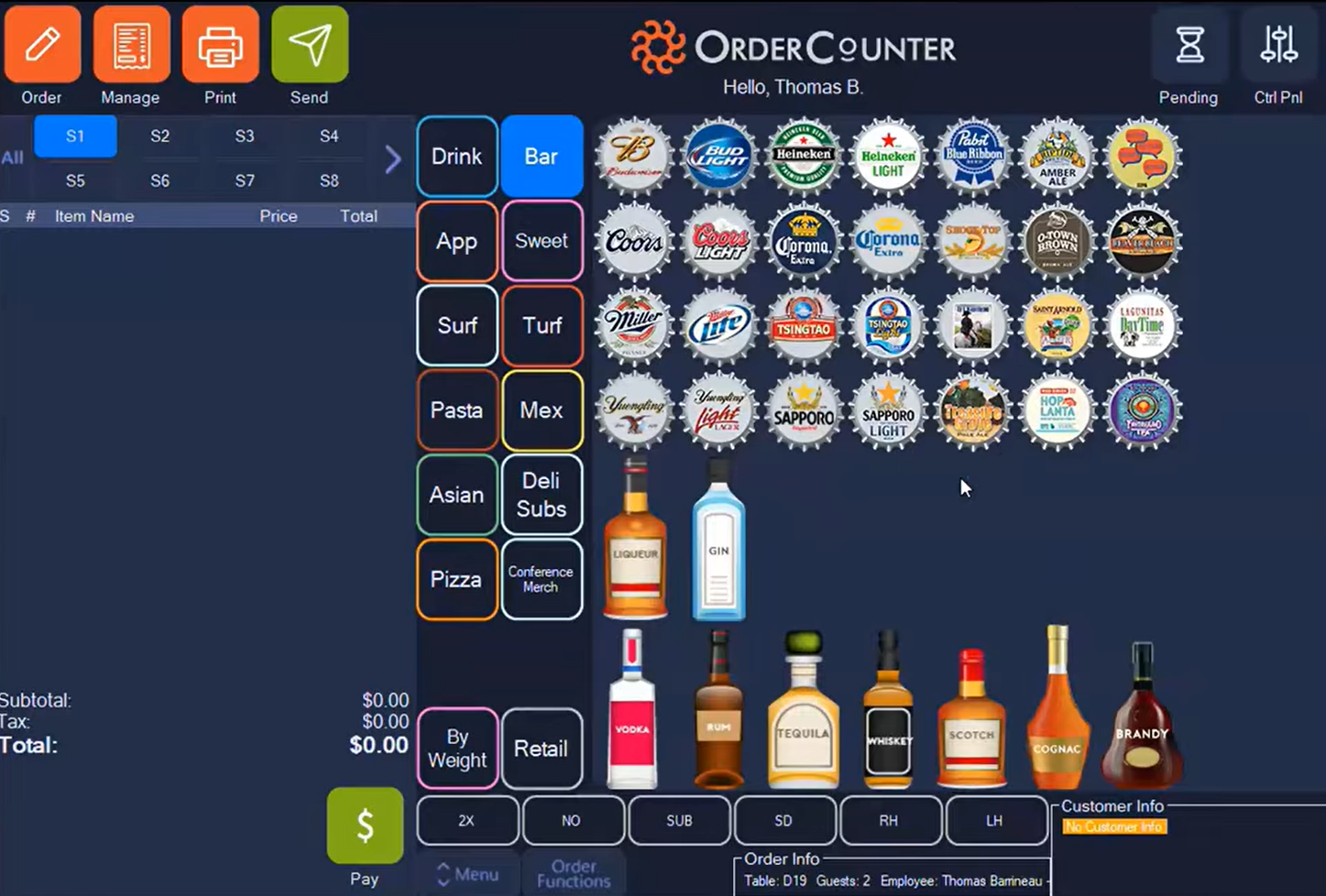
More Screenshots and Settings: OrderCounter Screenshots.pdf
No Comparison! OrderCounter vs Toast's Open View UI
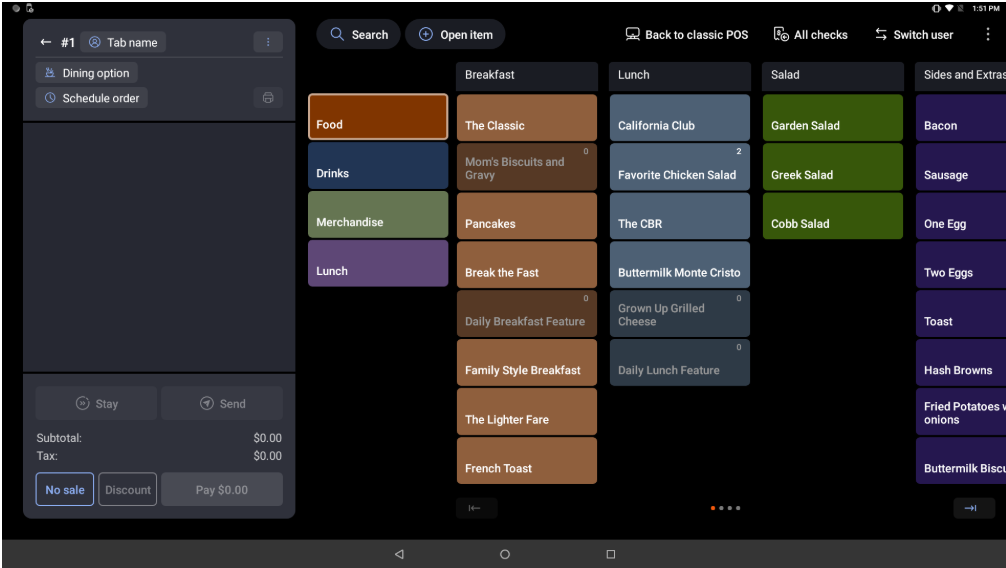
Toast shows only 3.5 categories, and the dot icon at the bottom indicates that there are three more pages/screen to be swiped to see them all.
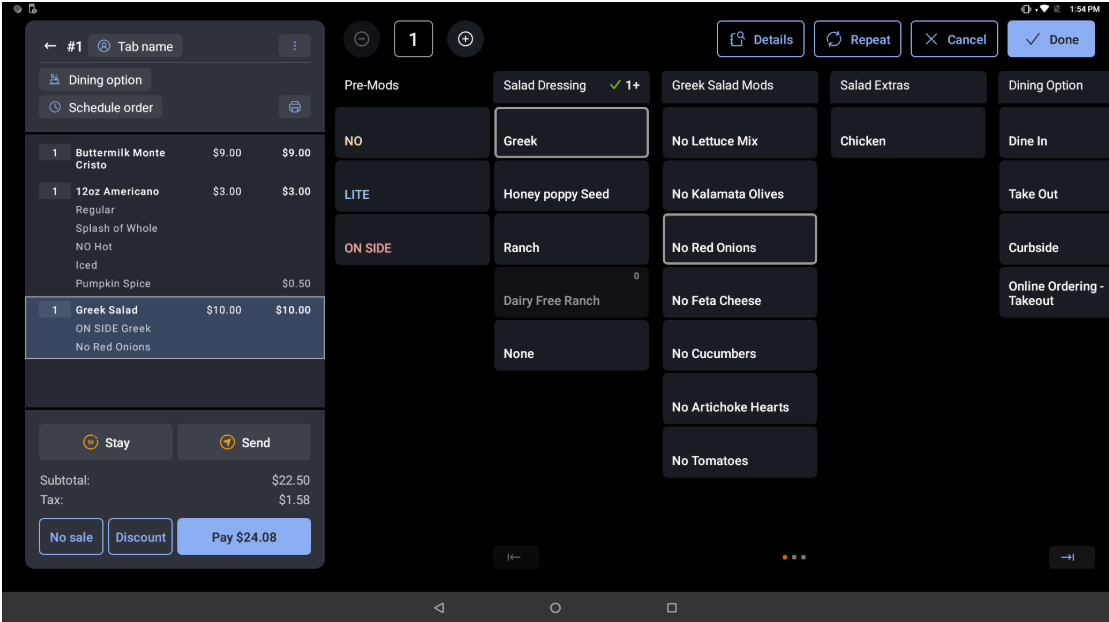
Modifiers make inefficient use of the screen by breaking them up into separate columns. Notice there is an entire column for ingredients to leave off, while this suggests which ingredients are included, it does not allow the server to order extra feta or olives!
Toast Has Poor Customer Support: Trustpilot
Order Counter Estimated Costs
SaaS:
Terminals: $75 First, $50 Second, $25 each additional (includes handheld devices)
One-Site Gift & Loyalty included
Self-Order Kiosk: $75 First, $50 Second, $25 each additional
Kitchen Display: $10 per view
DataCap Net-E-Pay: $30, unlimited Terminals/Kiosk (EBT, preauth, tokenization, secure offline 2x as fast)
DataCap Net-E-Pay: $30, Online Ordering
Add-Ons:
E-Services Bundle 1: 1% of E-Comm receipts, $200 cap/mo.
Online Ordering, QR Ordering, QR Pay (on receipt), QR Menu (dual price), DoorDash Drive, Hosted Gift & Loyalty
This is a fantastic way for new, smaller, or seasonal merchants to get all features at a discounted price.
* E-Services Bundle 2: $50 + 1% of E-Comm receipts, $200 cap/mo.
All the above PLUS Advanced 2-way 3rd Party delivery integration. Push images, prices, out of stock to partners. Mark up the in-store prices by a % for each channel to offset commissions. Changes are marked up by the %.
Hardware:
A typical 15.6" terminal with card reader, receipt printer, and cash drawer costs $843
Add a 10" customer-facing display for $230
An impact Kitchen printer is $300
Handheld devices - Pax A77 $325 / 920MAX $585
Note: systems with more than 2 terminals, or using handhelds or kiosks requires a server $375
Menu Build, Setup, Training:
$400 per location +
$100 per device
Sample System Configurations:
System 1: Small Counter Service
2 terminals with 10" CFD, cash drawer, card reader, receipt printer
1 Kitchen printer
[ Hardware: $ 2246, SaaS: $ 125, Setup/Training: $600 ]
Clover Comp: Hardware $4925, SaaS $ 115, Setup/Training (on agent)
E-Services bundle 1: 1% (at $5,000/mo) online volume: = $ 50
Substitute a 21.5" Kiosk for second terminal
[ Hardware: $ 3788, SaaS: $ 150, Setup/Training: $600 ]
Clover Comp: Hardware $7170, SaaS $ 130, Setup/Training (on agent)
System 2: Counter Service, Bar, Dining Room
1 Counter terminal with 10" CFD, cash drawer, card reader, receipt printer
1 Bar terminal, cash drawer, card reader, receipt printer
4 Handheld Pax A77
1 shared thermal receipt printer
2 Remote Impact Printers (Bar, Kitchen)
[ Hardware: $ 4090, SaaS: $ 225, Setup/Training: $1000 ]
Clover Comp: Hardware $12,620, SaaS $ 195, Setup/Training (on agent)
E-Services bundle 2: $ 50 + 1% (at $10,000/mo) online volume: = $ 150
Clover Comp: OrderSpoon $50 + .5% + Stream $58 = $ 158
Add Two 15.6" Touchscreen KDS
[ Hardware: $ 5140, SaaS: $ 170, Setup/Training: $1000 ]
Clover Comp: Hardware $14,010, SaaS $ 245, Setup/Training (on agent)