
This is the template that supports modifier import into a Square Menu
| Menu Group | Item Name | Variant / Modifier Group Name | Modifier | Default | Price |
Example 1:
An item assigned to a menu grop with a base price, and two modifier groups (note some modifiers add to the price).
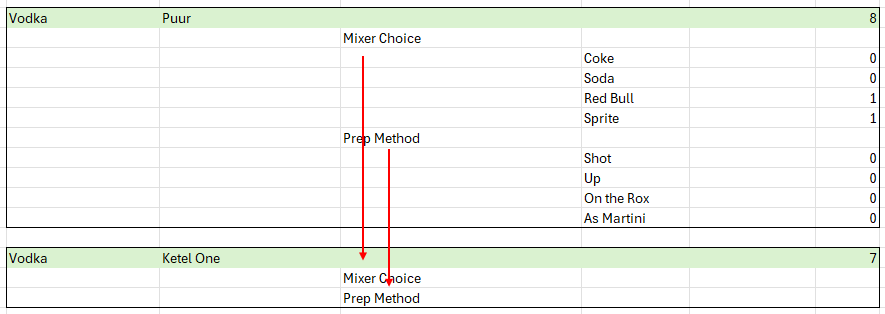 Hint: Once you have defined a modifier group and its ingredients, you only need to assign the group name to other items that share the same mod groups.
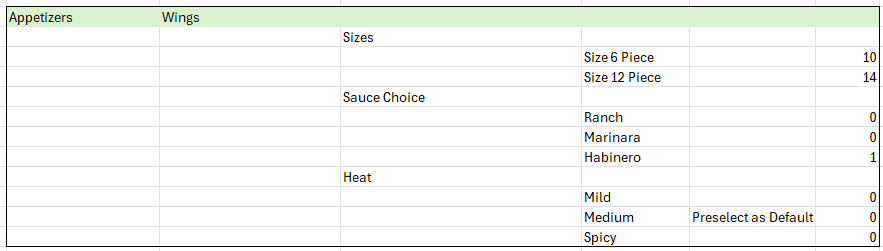
Example 2:
In this example the item has no price, but the size (variants) set the price. Additional mod groups can follow.
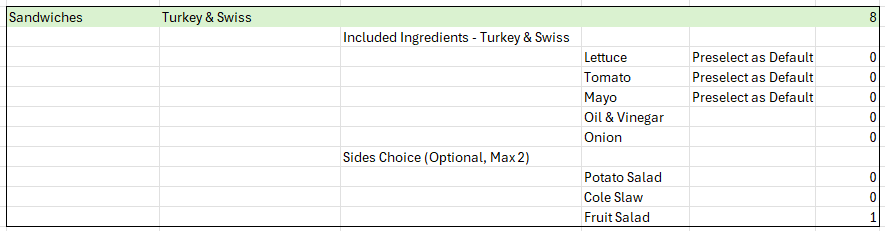
Example 3:
Advaced Modifier behavior - Preselected ingredients, and Optional, Min/Max seletion requirements.
How to Import:
Open your Square portal, tap Items & Services, Menus, Create a menu (top right)

NOTE 1: The WoFlo tool can take about 12 hours to complete your import. You will receive an email once completed.
NOTE 2: Once imported, you will need to create Categories and your items will need to be assigned to them. Often Category name and menu groups will match, but they don't have to. You can ask ManagerBot to do this for you "Place all menu group Sandwiches into the Food Category".