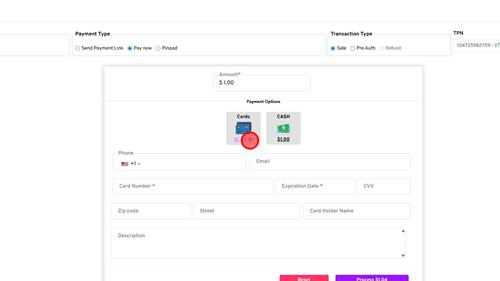
1 | Step 1 |
Click the "+" icon next to the card price | |
2 | Step 2 |
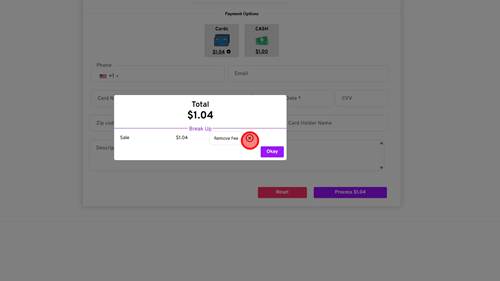
Click the "x" icon next to Remove Fee | |
3 | Step 3 |
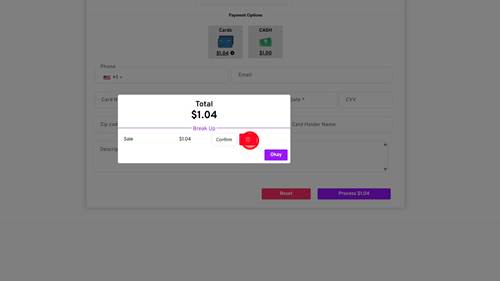
Click the Trash Can icon to confirm | |
4 | Step 4 |
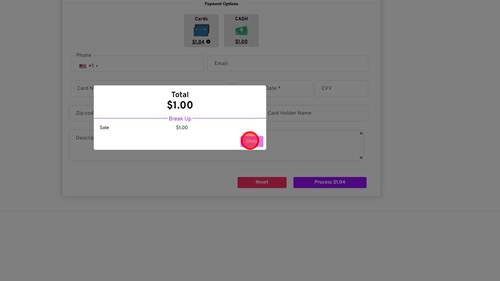
Click 'Okay' button to proceed | |

Modified on: Fri, 24 Jul, 2026 at 6:04 AM
1 | Step 1 |
Click the "+" icon next to the card price | |
2 | Step 2 |
Click the "x" icon next to Remove Fee | |
3 | Step 3 |
Click the Trash Can icon to confirm | |
4 | Step 4 |
Click 'Okay' button to proceed | |
Did you find it helpful? Yes No
Send feedback