
TIN Validation Process Part 1
Once you have the filtered Excel doc to go off of, you can now begin the process of validating all TIN information on these MIDs.
When going through each MID (which I like to do per agent), make sure the MID is approved and showing Invalid on the account.
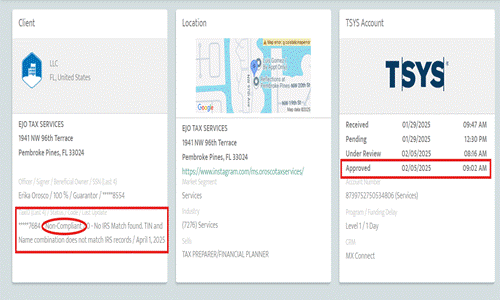
If the account is showing TIN compliant, double check the account is not being charged TIN non compliance fees within their monthly statement (see below). If not you can mark that MID as compliant and not have to worry about emailing the agent.

If the MID shows compliant and you are seeing this charge, submit a TIN case with the backend team and confirm the account is indeed TIN compliant.
If the MID is TIN compliant and getting TIN non compliance charges submit a refund (PPS Revshare case) and request a refund for the TIN non compliant fees the MID has been getting charged while being TIN compliant (you may have to do some reconciliation with available monthly statements to see when the charges started).
If the MID is not TIN compliant then we need to email the agent along with all their other TIN non compliant MIDs to get a W9 filled out.